SRX conversion
It is tested on Junos 12.x , 15.x , 18.x and it uses XML format to convert configs and policies.
Policies can not be extracted from SRX configuration output, because it does not provide rule order . So, from show security policies it can find out rule/policy orders.
Features
- Address books (Global and Policy based)
Name
Description
- Services and Service Groups
Name
Description
Source and Destination port
Session timeout
File Base
If you want to get the SRX device configs and policies manually, you need to select file under Type of conversion section and you can follow below steps to do conversion without any error.
SRX config and policy
Here are steps to provide correct output file from SRX devices:
Policy:
Login to SRX and execute
show security policies | display xmlCopy the output into file
Make sure only XML output is in the file
Supported file extensions is .log and .txt
General configs:
Login to SRX and execute
show configuration | display xmlCopy the output into file
Make sure only XML output is in the file
Supported file extensions is .log and .txt
For example if file starts or ends with some not xml lines please remove them. In below figure you can see first line is not xml formatted:

It is important to note that after conversion steps, you must paste output files of configuration first. Because, policies uses network/service objects and if they are not available on destination device, policies will be failed.
Using conversion
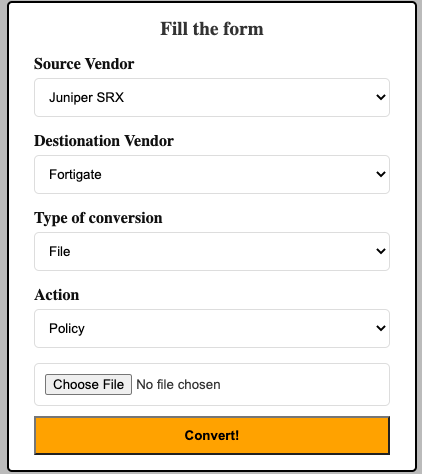
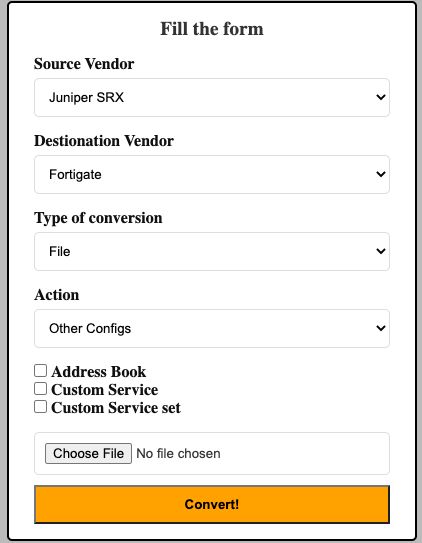
After SRX Config and policy steps, you can upload file through web UI. For policy conversion you should choose policy option under Action on web UI and upload policy XML formatted file to upload. However, if you choose other configs, new options will be available for Address Books, Services and Service-groups to provide better result. You can see below figure for both options.
Netconf
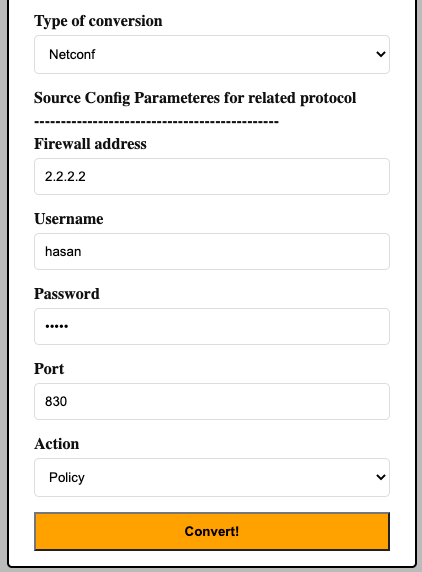
You can use Netconf for conversion in fwmig. It will connect to the srx device and read configs or policies and then it will converts to destination vendor. You need to provide access for fwmig on Netconf port (TCP/22 or TCP/830) on SRX device. Below figure is example of Netconf conversion:
Final step
Go to After conversion
